 Fullclip
Is there a Notion web clipper that adds tags automatically?
Yes. Fullclip, a Chrome web clipper for Notion, can tag clips automatically: optional AI reads the article, picks tags from the ones already in your Notion database and writes a two-sentence summary into your own column. The free plan includes 30 AI tag runs a month; Pro makes them unlimited. Notion’s official Web Clipper can’t add tags while clipping — its help center says “Not at the moment”.
Disclosure: we make Fullclip. Details about other clippers come from their official websites and help pages, checked on 2026-10-06, and linked below.
Which Notion web clippers can tag clips?
| Clipper | Tags while clipping | How | Price |
|---|---|---|---|
| Notion Web Clipper | No | Notion: “Not at the moment”; add tags afterwards in the database | Free |
| Save.to | Yes, by hand | Fill database properties such as tags in a form inside the extension | Free (4 forms); Pro $5.99/mo |
| Fullclip | Yes, automatically | AI picks from your existing tags and adds a two-sentence summary; can be turned off per clip | Free (30 AI runs/month, unlimited clips); Pro $4.99/mo, $39/yr or $59 once |
Sources: Notion help: Web Clipper · save.to. Checked 2026-10-06.
How does Fullclip tag clips automatically?
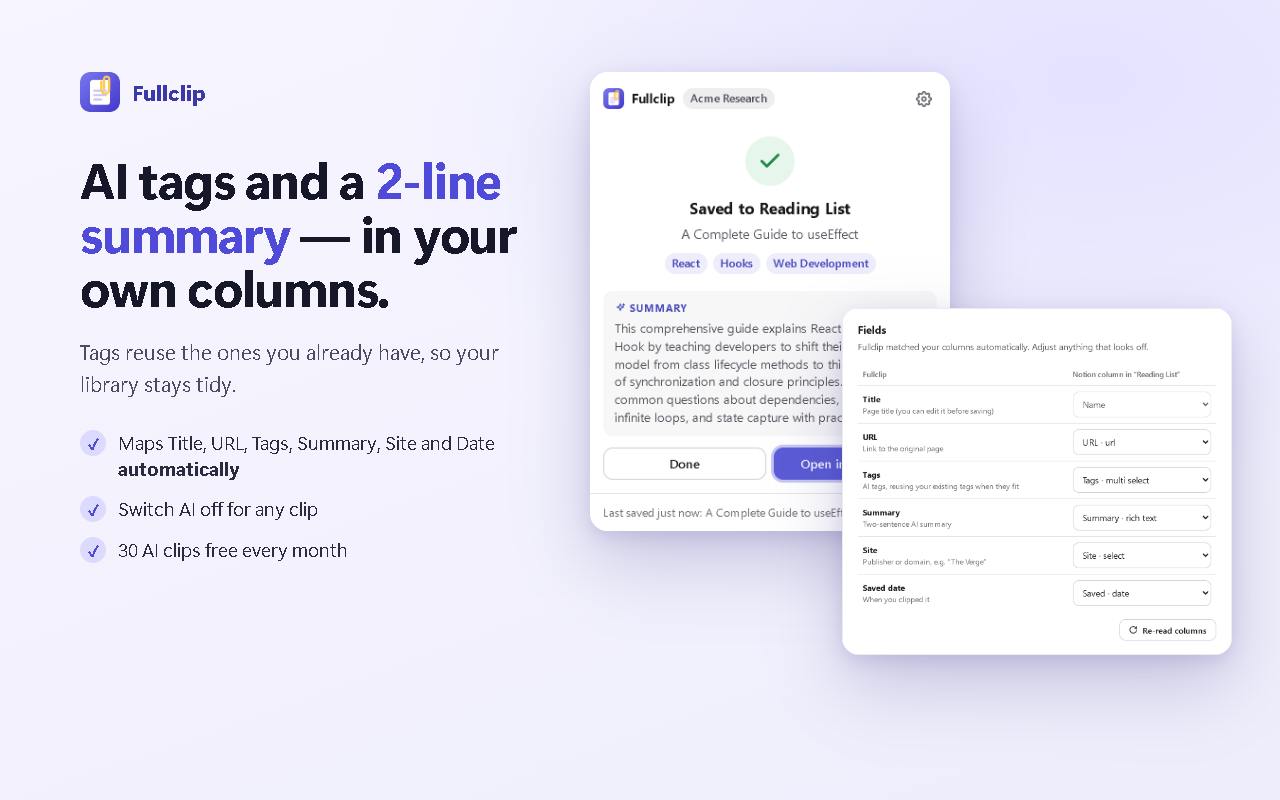
- Connect your database. Fullclip finds your Tags column (multi-select) and a text column for the summary, or creates a “Fullclip Library” database with both.
- Save an article. Press Alt+Shift+S. Fullclip extracts the full article and, with AI on, sends the text together with the tags you already use.
- Get tags you already use. The AI picks matching tags from your list and writes a two-sentence summary. Both land in your columns next to Title, URL, Site and Saved date.
Why reuse existing tags instead of inventing new ones?
A tag is only useful if the same word is used every time. Clippers that suggest free-form tags tend to produce near-duplicates (“AI”, “ai-tools”, “Artificial intelligence”) that break filtered views. Picking from the tags already in your database keeps every project view working as your library grows.
Can I tag clips without AI?
Yes. Leave AI off for a clip and add tags in Notion afterwards, or use a database template. Fullclip still saves the full article with title, URL, site and saved date filled in.
Frequently asked questions
Can the official Notion Web Clipper add tags?
Not while clipping. Notion’s help center answers “Not at the moment”; you add tags after opening the clip in your database (Notion help).
Will Fullclip create lots of new tags?
It is built not to. Fullclip sends the tags already in your database’s Tags column along with the article, so the AI picks from your existing vocabulary and your filters stay useful.
Can I turn AI tagging off?
Yes, per clip. Without AI, Fullclip still saves the full article with title, URL, site and saved date.
How many AI tag runs are free?
30 AI tag + summary runs per month on the free plan. Pro ($4.99/month, $39/year or $59 once) makes them unlimited.
What happens to the article text?
When AI is on, the article text is sent for tagging and summarising and is not stored or used for training. Clips go from your browser to your Notion workspace.
Try Fullclip
Unlimited full-page clipping is free. Pro: $4.99/month, $39/year or $59 once.