 Fullclip
Notion Web Clipper not working? Why it fails and how to fix it
When the Notion Web Clipper isn’t working, the cause is usually one of four things: you aren’t logged in to Notion in that browser, the page is one the clipper can’t read, you are sharing from an app on your phone instead of the browser, or the site can’t be parsed cleanly — Notion’s own help center says formatting “will vary” by site. Fixes for each are below. If clips arrive incomplete, a clipper that saves the full article, such as Fullclip, is the alternative.
Disclosure: we make Fullclip. Notion Web Clipper details come from Notion’s help center and website, checked on 2026-10-06, and linked below.
Quick fixes
| Symptom | Likely cause | Fix |
|---|---|---|
| Clipper asks you to log in, or nothing happens | Not logged in to Notion in this browser or profile | Log in at notion.so in the same browser profile, then reload the page and clip again |
| Can’t find the page or database to save into | Wrong workspace selected | Pick the right workspace in the clipper first, then the page or database |
| “This app is not supported” on mobile | Sharing from an app, not the browser | Open the page in your mobile browser and share from there (per Notion help) |
| Parts of the article are missing | The site can’t be parsed the same way as others | Report the page to Notion, or save it with a full-article clipper |
| No Safari clipper in the App Store | Notion removed it from the App Store | Install from notion.com/web-clipper (per Notion help) |
| Extension button does nothing on any page | Outdated or conflicting extension | Update or reinstall the clipper, then try with other extensions turned off |
Sources: Notion help: Web Clipper · notion.com/web-clipper. Checked 2026-10-06.
Why is my Notion Web Clipper not saving the full article?
Notion’s help center answers this directly: websites are built in all kinds of ways, so they can’t all be parsed the same way, and formatting in Notion will vary (Notion help). In practice three things cause most gaps:
- Content that loads with JavaScript after the page opens.
- Code inside web components. Documentation sites such as MDN render code samples inside Shadow DOM, which a clipper reading only the regular page tree doesn’t see.
- Very long pages. Notion’s public API accepts up to 100 blocks per request (Notion API limits), so long articles have to be written in batches.
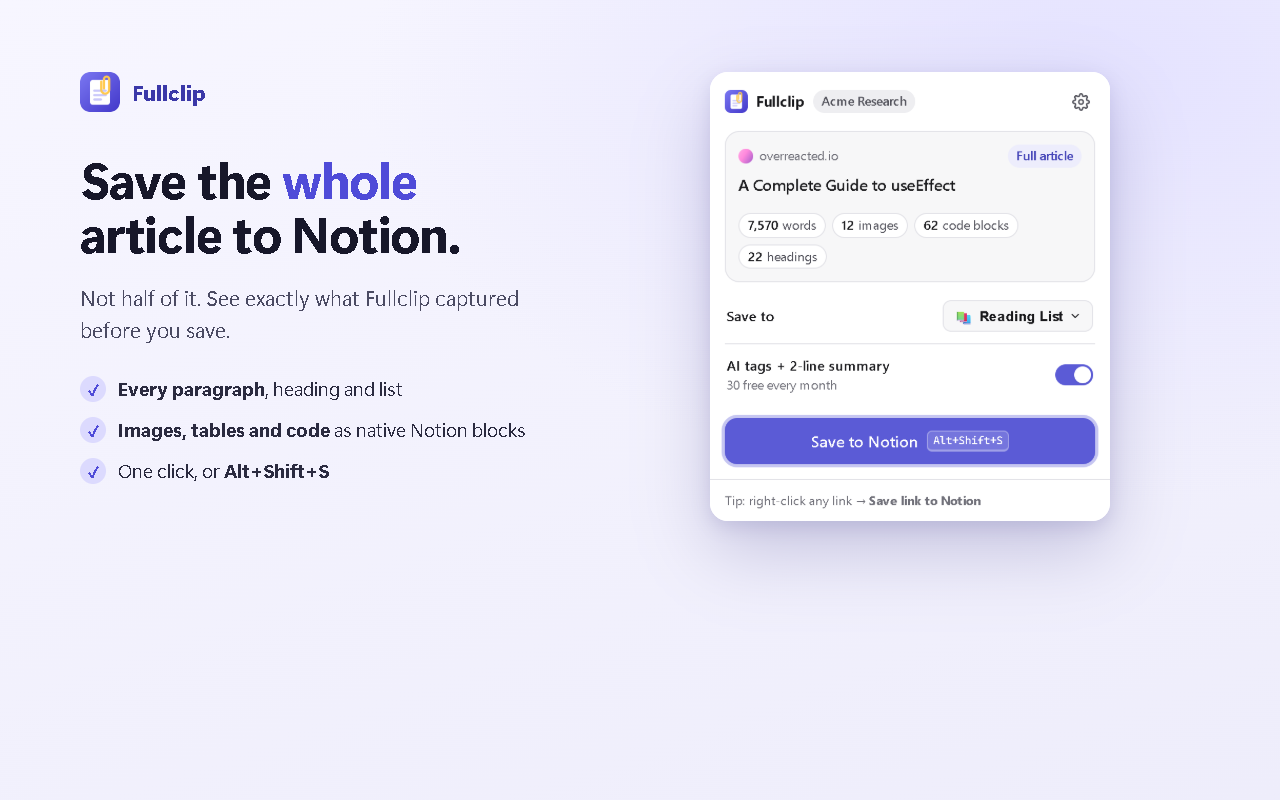
Fullclip is built for exactly this. It reads the rendered article in your browser — including code inside web components — writes long articles in batches, and shows what it captured before you save, for example “7,570 words · 12 images · 62 code blocks”. Code keeps its language, tables stay native Notion tables.
Why does the Notion Web Clipper keep asking me to log in?
The clipper uses your Notion login in that browser. If you use several Chrome profiles, are in a private window, or clear cookies on exit, it can’t see your session. Log in at notion.so in the same profile, reload the page you want to clip, and try again.
Why can’t I clip from the Twitter or Notes app on my phone?
Notion’s help center says the mobile clipper only works for entire pages from your web browser, or photos from your camera roll — not other apps such as the Twitter app or iOS Notes (Notion help). Open the link in your browser, then use the share sheet.
Is there an alternative when the Notion Web Clipper keeps failing?
- Fullclip — full articles as native Notion blocks, AI tags from your existing list, a two-sentence summary, an offline queue that retries automatically, and Pocket/Instapaper import. Unlimited clips free. Fullclip vs Notion Web Clipper.
- Copy and paste — for a one-off page, select the article and paste it into Notion; check code blocks and tables afterwards.
- More options: the best web clippers for Notion.
Frequently asked questions
Why does the Notion Web Clipper only save part of an article?
Notion’s help center says websites “can’t all be parsed the same way” and that formatting in Notion will vary (Notion help). Pages that load content with JavaScript or render code inside web components are the usual culprits. Fullclip reads the rendered article in your browser, including code inside web components, and writes long pages in batches.
Why does the clipper say “This app is not supported” on my phone?
Notion’s help center says the mobile clipper works for entire pages from your web browser or photos from your camera roll, not other apps such as the Twitter app or iOS Notes (Notion help). Open the page in your browser first, then share it to Notion.
Where is the Notion Web Clipper for Safari?
Notion says the Safari Web Clipper is no longer in the Apple App Store; install it from notion.com/web-clipper instead (Notion help).
Can I add tags while clipping?
Not with the official clipper: Notion’s answer is “Not at the moment” — open the clip in your database afterwards to add tags (Notion help). Fullclip can add tags from your existing list automatically: see how.
Try Fullclip
Unlimited full-page clipping is free. Pro: $4.99/month, $39/year or $59 once.