 Fullclip
The Pocket alternative for Notion users
Pocket shut down in July 2025. If you already keep notes in Notion, the simplest replacement is to save articles straight into a Notion database. Fullclip imports your Pocket export (CSV or HTML) with titles, tags and original save dates, then saves new articles in full with one click.
Disclosure: we make Fullclip. Details about other apps come from each product’s public website, checked on 2026-10-06.
What happened to Pocket?
Mozilla announced that Pocket would shut down on July 8, 2025. Users could export their saves until October 8, 2025, after which their data was permanently deleted. If you exported your library before that date, you still have everything you need to move it. (Source: Mozilla)
What are your options after Pocket?
| Option | Price (official site) | Good fit if… |
|---|---|---|
| Instapaper | Free plan; Premium $5.99/month or $59.99/year | You want a dedicated reading app; Premium adds full-text search, a permanent archive and text-to-speech |
| Raindrop.io | Free plan with unlimited bookmarks and collections; paid Pro | You want a bookmark manager with apps for Mac, iOS, Android and browsers |
| Readwise Reader | $9.99/month billed annually or $12.99 monthly; 30-day free trial | You highlight heavily and want highlights exported to Notion or Obsidian |
| Notion + Fullclip | Free (import up to 100 items); Pro $4.99/mo, $39/yr or $59 once | Your notes already live in Notion and you want your reading there too, in full |
Sources: instapaper.com/premium · raindrop.io · readwise.io. Checked 2026-10-06.
How do you move your Pocket saves into Notion?
- Find your Pocket export. Locate the Pocket export file you downloaded (CSV or HTML). Instapaper users can export a CSV from Instapaper’s settings.
- Install Fullclip and connect Notion. Install Fullclip and connect your Notion workspace. Pick a database, or let Fullclip create a ready-made “Fullclip Library” database.
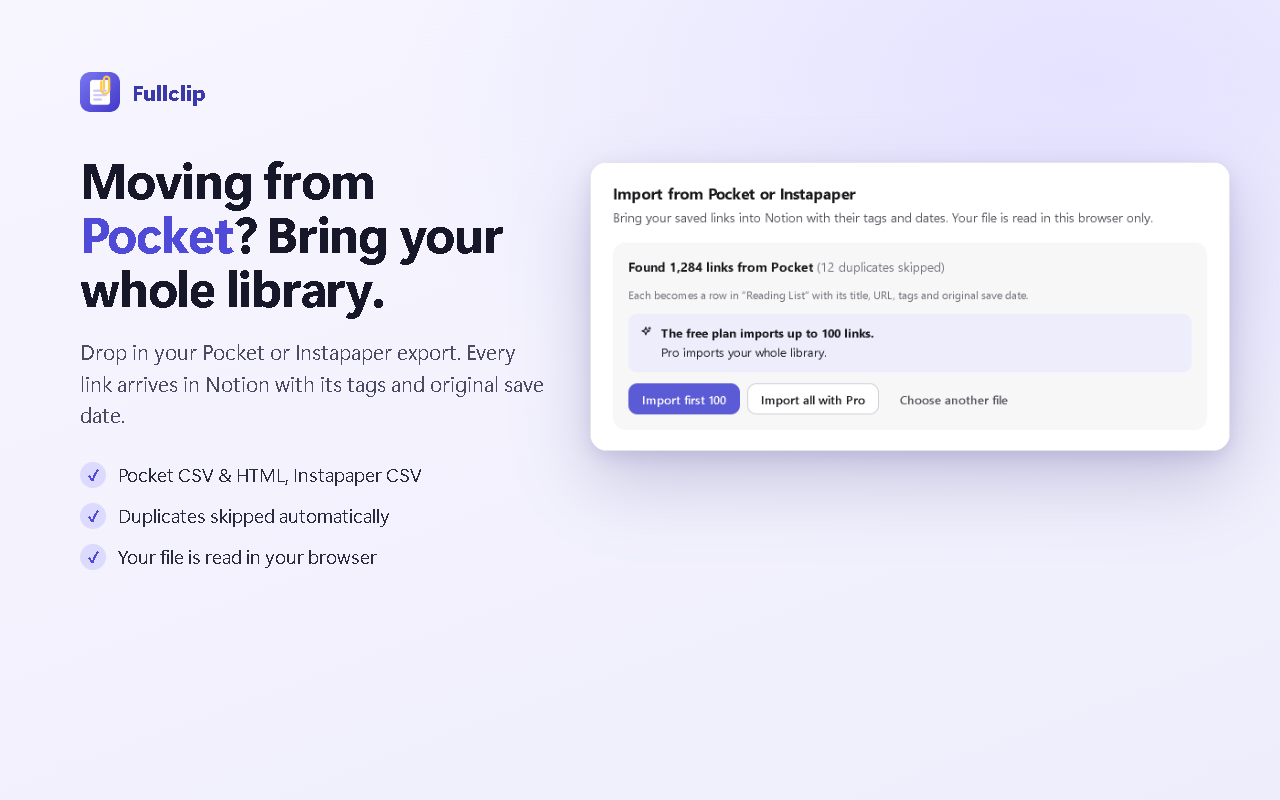
- Open the import screen. Open Fullclip settings and choose “Import from Pocket / Instapaper”, then drop in your export file. The file is read in your browser.
- Review the preview. Fullclip shows how many links it found and skips duplicates. The free plan imports up to 100 items; Pro imports your whole library.
- Import. Each saved link becomes a row in your Notion database with its title, URL, tags and original save date.
What carries over from Pocket?
| In your Pocket export | In Notion |
|---|---|
| title | Title |
| url | URL |
| tags | Tags |
| time_added | Saved (original save date) |
Coming from Instapaper?
Export your Instapaper library as CSV and drop it into the same import screen. Each link comes into Notion with its title, URL and original save date, plus tags where your export includes them.
After the import: saving new articles
From then on, open any article and press Alt+Shift+S. Fullclip saves the complete article — headings, images, tables and code blocks — into the same database, with optional AI tags and a two-sentence summary. If you are offline, the clip waits in a queue and retries automatically. See the full guide.
Frequently asked questions
Can I still export my data from Pocket?
No. Mozilla said users could export their saves until October 8, 2025, after which the data would be permanently deleted (Mozilla). If you downloaded your export before then, keep the file — Fullclip can import it.
Will my Pocket tags carry over?
Yes. Tags from the Pocket export become values in your Notion Tags column, alongside the title, URL and original save date.
Is importing free?
Yes, up to 100 items on the free plan. Fullclip Pro ($4.99/month, $39/year or $59 once) imports your whole library.
Does the import save the full text of every article?
The import brings over each saved link with its title, URL, tags and save date, so your reading list is in Notion. To save an article’s full text, open it and clip it with Fullclip.
What about Instapaper?
The same import screen accepts an Instapaper CSV export.
Try Fullclip
Import up to 100 Pocket items free. Pro: $4.99/month, $39/year or $59 once.