 Fullclip
How do I move my Instapaper library into Notion?
Export your Instapaper library as a CSV from Instapaper’s settings, then import the file with Fullclip, a Chrome web clipper for Notion. Every saved article becomes a row in a Notion database with its title, URL and original save date, and duplicates are skipped. The first 100 items are free; Pro imports the whole library for $4.99/month, $39/year or $59 once.
Disclosure: we make Fullclip. Instapaper details come from Instapaper’s own docs and pricing page, checked on 2026-10-06, and linked below.
Instapaper to Notion at a glance
| Question | Answer |
|---|---|
| Where do I export? | Instapaper settings → Export → CSV (instapaper.com/user) |
| How do I get the file? | Instapaper emails a link to the CSV (Instapaper docs) |
| What arrives in Notion | One database row per article: title, URL, original save date |
| Free import allowance | 100 items; duplicate URLs skipped |
| Saving new articles | Unlimited and free, as full articles in native Notion blocks |
| Pro price | $4.99/month, $39/year or $59 once (unlimited imports and AI tags) |
How do I move my Instapaper library into Notion?
- Export from Instapaper. Open Instapaper settings (instapaper.com/user), scroll to Export and request the CSV file. Instapaper emails you a link to it.
- Install Fullclip and connect Notion. Install Fullclip and connect your Notion workspace. Pick the database for your reading list, or let Fullclip create a ready-made “Fullclip Library” database.
- Open the import screen. In Fullclip settings choose “Import from Pocket / Instapaper” and drop in the CSV. The file is read in your browser.
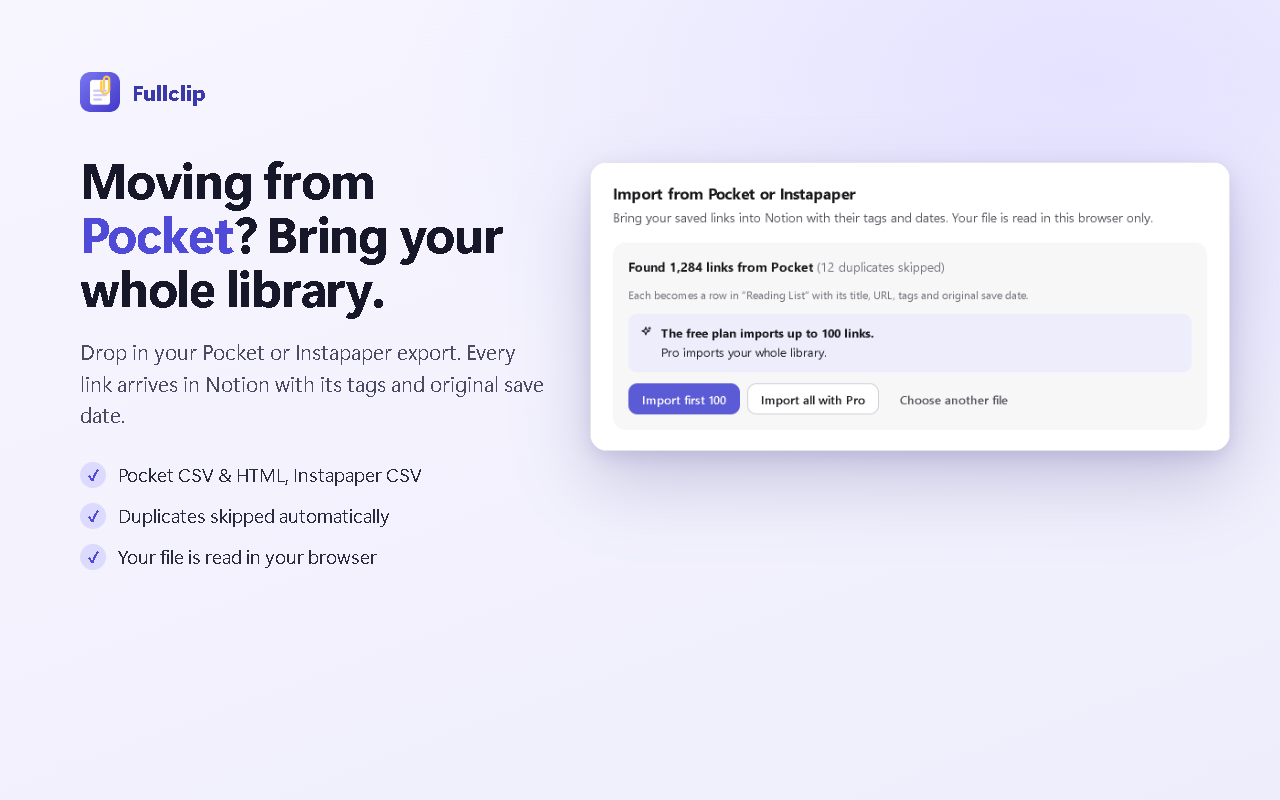
- Check the preview. Fullclip shows how many links it found and skips duplicate URLs. The free plan imports up to 100 items; Pro imports the whole library.
- Import. Each saved article becomes a row in your Notion database with its title, URL and original save date.
What carries over from Instapaper to Notion?
| Instapaper CSV column | Notion database column |
|---|---|
| URL | URL |
| Title | Title |
| Timestamp | Saved (original save date) |
| Tags (when your export includes them) | Tags (multi-select) |
Fullclip also fills a Site column from each link, so you can filter your library by publication.
Why move your reading list into Notion?
If your notes, projects and research already live in Notion, a reading database next to them means one search box for everything, and articles you can link from any page. Add a “Status” select (To read / Read) and a view per project, and the database works as a read-later queue.
Fullclip keeps it filling up: open any article and press Alt+Shift+S. The complete article is saved as native Notion blocks — headings, images, tables and code blocks with their language — and optional AI picks tags from the ones already in your database and writes a two-sentence summary. How full-article saving works.
Should I keep Instapaper too?
You can. Instapaper is a dedicated reading app with a free plan; Premium is $5.99/month or $59.99/year (instapaper.com/premium). Many people keep a reading app on their phone and use Notion as the permanent library. Leaving Pocket instead? See Pocket alternative for Notion.
Frequently asked questions
Does Instapaper have a Notion integration?
Instapaper’s own export options are a CSV of your account, plus PDF, ePub and RSS downloads of reading lists (Instapaper docs). To get the library into a Notion database, export the CSV and import it with Fullclip.
Do I need Instapaper Premium to export?
The CSV export is in the Export section of Instapaper’s settings page (instapaper.com/user); see Instapaper’s export docs for current details.
How long does the Instapaper export take?
Instapaper emails the CSV link; its docs say that for large libraries this can take a few hours (Instapaper docs).
Is importing Instapaper into Notion free?
Yes, up to 100 items on Fullclip’s free plan. Pro ($4.99/month, $39/year or $59 once) imports your whole library. Clipping new articles is unlimited on both plans.
Will the full text of every article be imported?
The import brings your reading list into Notion: one row per article with title, URL and save date. To keep an article’s full text in Notion, open it and save it with Fullclip (Alt+Shift+S); headings, images, tables and code blocks become native Notion blocks.
Try Fullclip
Unlimited full-page clipping is free. Pro: $4.99/month, $39/year or $59 once.